

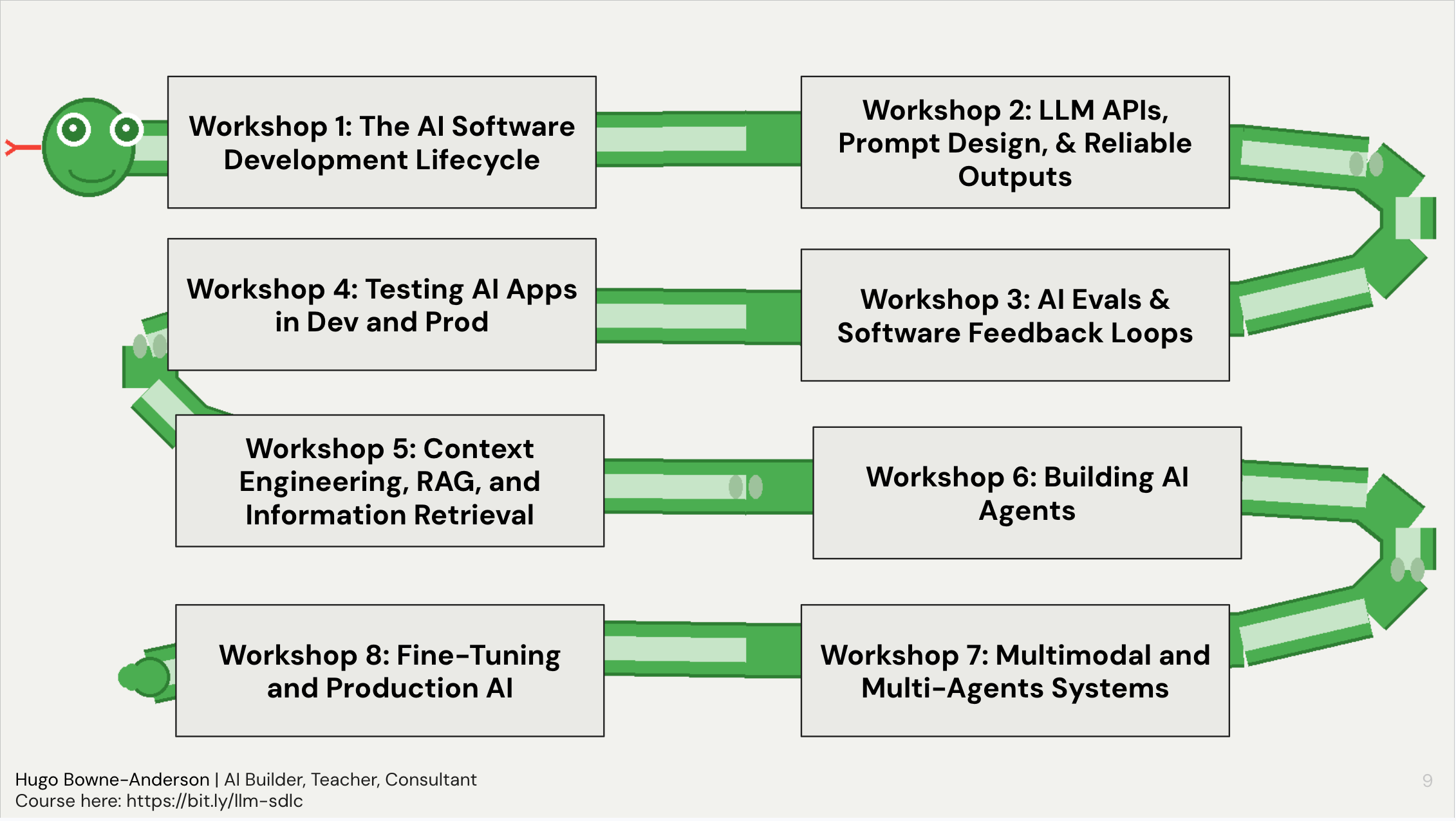
Over the past year and four cohorts, we’ve taught over 300 Builders from Netflix, Amazon, Instacart, and more how to build AI-Powered Applications. These are the 10 most common questions they’ve asked. This is from a list of 100 question and answers that we share with all students in the course.
👉 These are also the kinds of things we cover in our Building AI Applications course. Our final cohort starts March 9. Here is a 25% discount code for readers. 👈
Also check out Chapter 1 of our 300 page course reader covering evaluation, testing, RAG, agents, multimodal systems, fine-tuning, production deployment, and more.
Each question below has a short, concise answer and we then provide more detail in an “In practice” section.
Builders mentioned in this post were students, builders in residence, or guest speakers in the course.
This post was co-written by Hugo Bowne-Anderson, Stefan Krawczyk, Pastor Soto, and Mike Powers. Mike and Pastor were instrumental in building the pipeline that took 1,000s of Discord messages and workshop transcripts to extract the questions (and parts of the answers!)
The top 10 questions were:
Q2: What’s the difference between an LLM, augmented LLMs, LLM workflows, agents, and multi-agent systems?
Q6: What are guardrails in LLM applications and how do I implement them effectively?
Q7: How do I write deterministic tests for non-deterministic LLM outputs?
Q8: What is an MVE (Minimum Viable Eval) and how do I get started with AIevaluation?
Q9: What is an LLM Judge and how do I use them to evaluate other LLM outputs?
Q1: How do I get reliable and consistent outputs from LLMs?
You don’t eliminate non-determinism, you build processes around it. LLMs are fundamentally stochastic: same input, different output. The practitioners who ship reliable LLM applications have accepted this and invest in three things:
1) prompt & context engineering with tight feedback loops,
2) structured outputs and post-processing validation, and
3) systematic evaluation and testing.
In practice
Start with your prompts and context. Treat them like code: version control them, change one variable at a time, and iterate based on observed failures. Nathan Danielsen (AI Engineer, Carvana) did over 600 iterations on an initial MVP production prompt (and hundreds more after launch). Use system prompts to set behavior, delimiters to separate instructions from data, and structured output modes (JSON, Pydantic schemas) to enforce format consistency. Also look at distributions of prompt results by sending the same prompt to the system 20 times (for example).
Build evaluation and testing from day one. The highest-value activity is putting traces in a spreadsheet, labeling them pass/fail, and categorizing where things go wrong. Start with 20 representative queries. This manual inspection reveals failure modes that no automated system will catch on its own. From there, scale with code-based checks (regex, schema validation, length checks) and LLM-as-judge evaluators, always preferring deterministic checks where they work.
Design for modularity. Break large tasks into smaller, more constrained sub-tasks. One example in the course is a veterinary transcription app that improved dramatically by giving the LLM specific, smaller extraction tasks rather than one big request. This reduces variance and makes each piece independently testable. Build so you can swap models, change prompts, and add guardrails without rewriting everything.
Don’t use an LLM when you don’t need one. Regex for date extraction, fuzzy matching libraries for string similarity, etc…: these are deterministic, cheaper, and often more reliable than an LLM call for specific tasks.
The bottom line: you will never have certainty with these systems. What you can have is a process that catches most failures before they reach your users.
Important note: As William Horton (MLE, Maven Clinic) pointed out, non-determinism doesn’t matter if the result is the same. For example, a medical chatbot asked “What should I do for a mild fever?” might respond “Rest, stay hydrated, and take acetaminophen: see a doctor if it exceeds 103°F” or it might respond “An OTC pain reliever like acetaminophen can help, along with fluids and rest: consult your physician if the fever passes 103°F.” The wording is different but the medical guidance is identical. The non-determinism is cosmetic.
Q2: What’s the difference between an LLM, augmented LLMs, LLM workflows, agents, and multi-agent systems?
An LLM is stateless: text in, text out with no memory or context (unless specified in the input);
An augmented LLM adds memory to the system, retrieves information to ground the system (via RAG, for example), and/or adds tool calls (such as pinging an API, sending an email, or writing code to your local file system). As Anthropic points out, virtually all LLMs in production have “access to these augmented capabilities”;
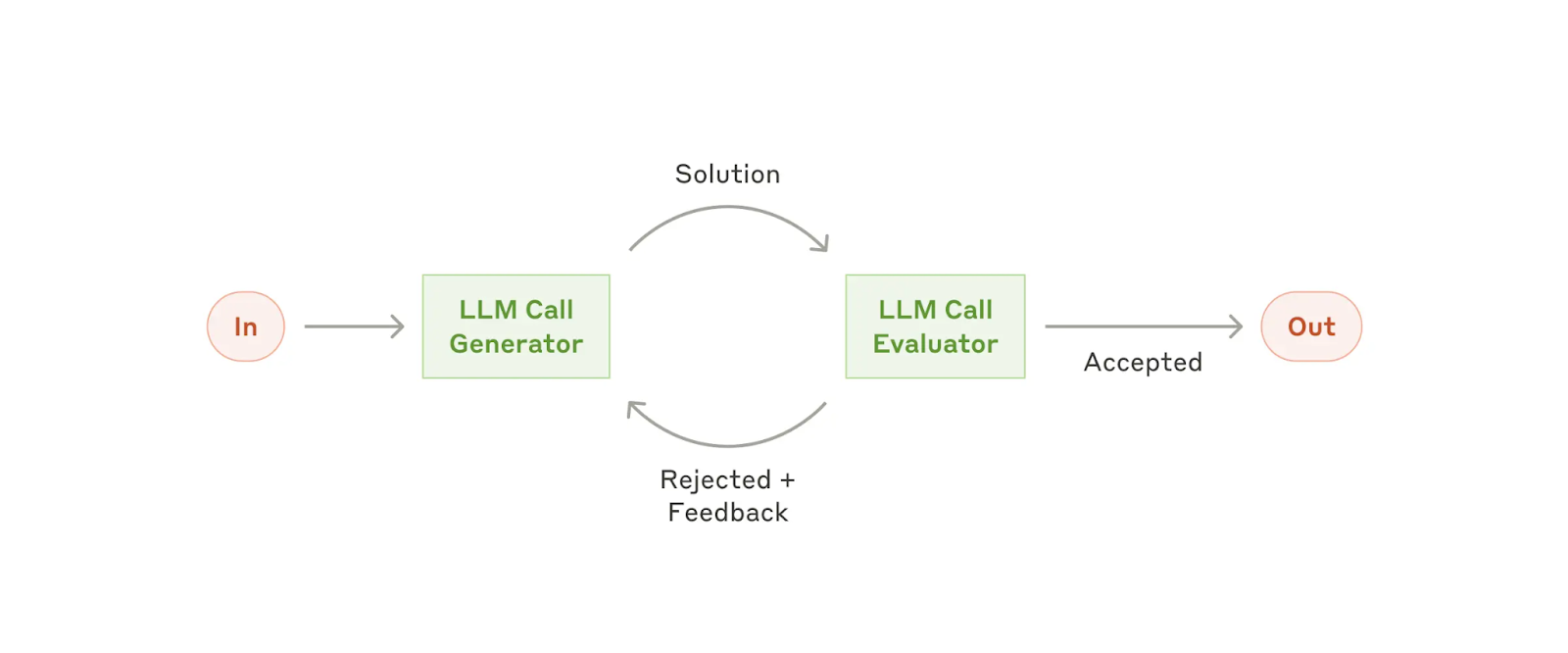
An LLM workflow is a system where LLMs and tools are orchestrated through predefined code paths: you as the developer decide what happens when;
An Agent is a system where the LLM dynamically directs its own processes and tool usage. This takes the shape of an LLM with tools in a loop (see Q3 on Agent Harnesses);
A Multi-agent system is a design pattern in which a primary orchestrating agentdelegates specialized, “heavy-duty” tasks to autonomous sub-agents to maintain system performance and focus.
In practice
The practical marker between LLM workflows and Agents: in an LLM workflow, the control flow is a DAG (directed acyclic graph) with predictable steps. In an agent, there’s a loop where the LLM decides what tool to call next, what to do with the result, and when to stop.
Where most value lives today. The augmented LLM and LLM workflows: an LLM with retrieval, memory, and a handful of tool calls covers the vast majority of production use cases. A meeting transcription bot that converts speech to text, summarizes, and emails minutes? People call it an agent because they get an email from it, but it’s really a workflow. If a simple tool call works, don’t build a fully-fledged agent.
When agents make sense. Agents shine for open-ended problems where you can’t predict the required steps in advance: research is the canonical example. Deep Research, Claude Code, and similar systems are genuinely agentic because the path is truly dynamic. But this comes with real costs: brittleness, complexity creep, and misaligned autonomy.
The two cultures of AI agents. In the course, we teach these two approaches: (1) build reliable software with workflows and few tool calls, strong evaluation, and predictable behavior; (2) build high-agency AI collaborators with strong human supervision. The danger zone is high agency with low supervision. Both cultures require evaluation and observability.
Q3: What is an Agent Harness?
An agent harness is the scaffolding around the LLM that manages tool execution, message history, and context. It is the infrastructure that wraps around an LLM to turn it into an agent.
In practice
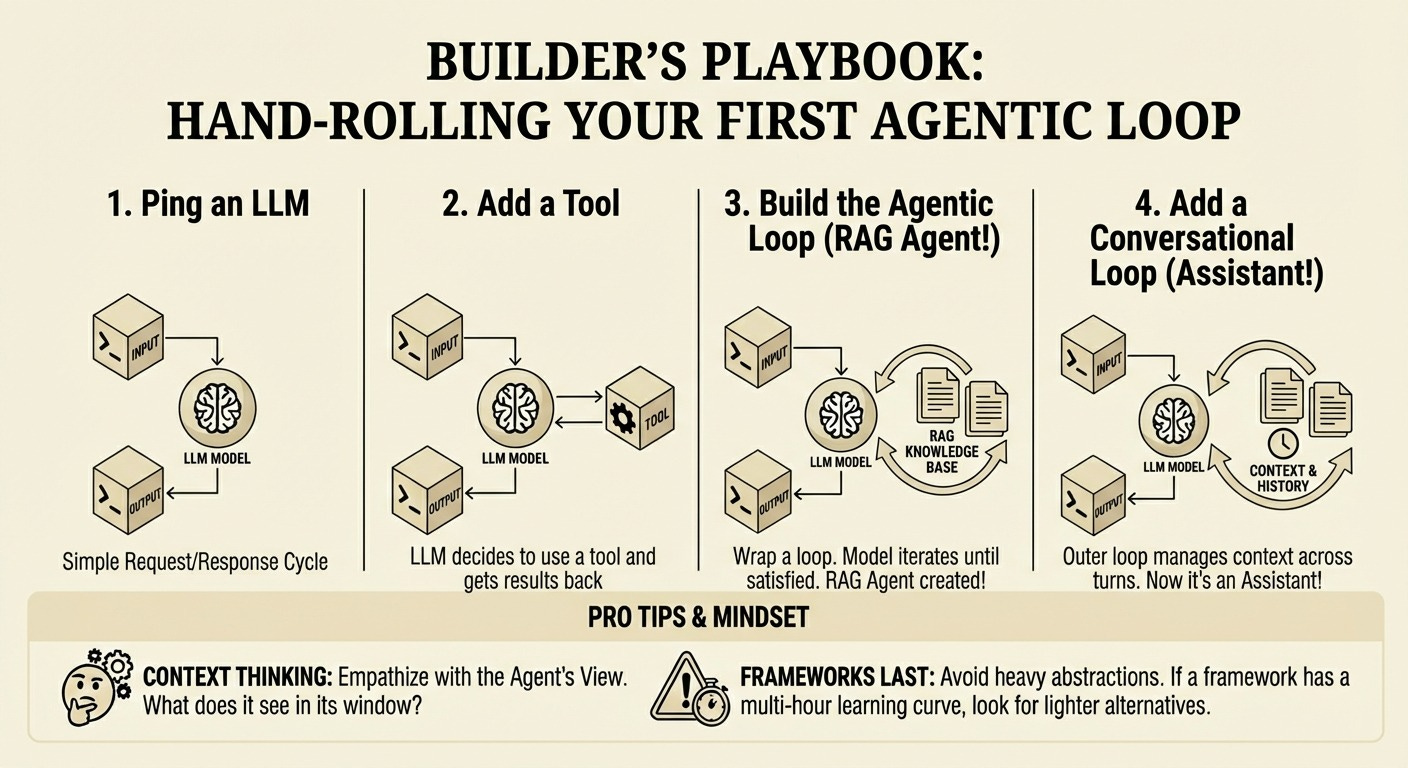
Recall that an agent is a system where the LLM dynamically directs its own processes and tool usage: Agents are just LLMs with tools in an agentic loop. There is often a conversational loop with the user also.
The agent harness handles the
Loop: prompting the model, parsing its output, executing tools, feeding results back
Tool execution: actually running the code/commands the model asks for
Context management: what goes in the prompt, token limits, history
Safety/guardrails: confirmation prompts, sandboxing, disallowed actions
State: keeping track of the conversation, files touched, etc.
And more.
Think of it like this: the LLM is the brain, the harness is everything else that lets it actually do things.
Embrace Harness Re-architecture: Teams must be willing to constantly reassess and rebuild. The popular agent Manus has been re-architected five times since March 2024, and LangChain’s Open Deep Research was rebuilt multiple times in a year to keep pace with model improvements. Even Anthropic rips out Claude Code’s agent harness as models improve!
The hello world of agent harnesses: this covers the loop, tool execution, and basic context management. What it doesn’t have: safety guardrails, token limits, persistence, or even a system prompt!
Two other interesting and powerful harnesses
The Pi Coding Agent: adds context loading AGENTS.md from multiple directories, persistent sessions you can resume and branch, and an extensibility system (skills, extensions, prompts);
OpenClaw (which builds on Pi): a persistent daemon (always-on, not invoked), chat as the interface (Telegram, WhatsApp, etc.), file-based continuity (SOUL.md, MEMORY.md, daily logs), proactive behavior (heartbeats, cron), pre-integrated tools (browser, sub-agents, device control), and the ability to message you without being prompted.
Thanks for reading Vanishing Gradients! Subscribe for free to receive new posts and support my work.
Subscribe
Q4: When do I use Retrieval/RAG vs Context Engineering?
These aren’t competing approaches: they’re tools at different levels of a system.
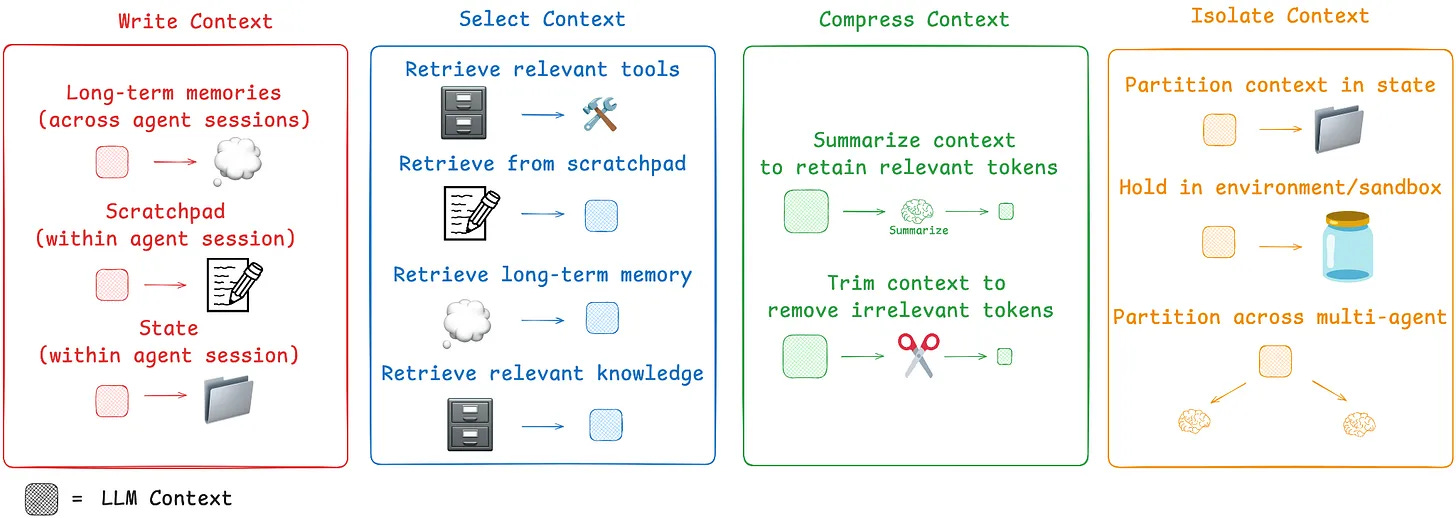
Context engineering refers to “the set of strategies for curating and maintaining the optimal set of tokens (information/context) during LLM inference, including all the other information that may land there outside of the prompts.”
RAG is one technique doing this via retrieval, that is, adding information from external sources to the context you provide the LLM.
In practice
Context engineering is the real skill. Andrej Karpathy’s definition: “the delicate art and science of filling the context window with just the right information for the next step.” We tend to agree as the term “prompt engineering” trivializes what is actually an engineering discipline. Every system, whether it uses RAG, tool calls, or hand-curated context, is doing context engineering. The question is always: what information does the model need to produce a good response for this specific step?
“Context engineering does a few things. Number one, it is the job today. If you’re looking to build a production system, that is the job: engineer your context window. Prompt engineering’s like script kitty versus context engineering’s more like software engineering.”
Why you can’t just dump everything into long context. Context rot is real. See Jeff Huber’s research at Chroma: as input length increases, model performance degrades significantly: down to ~50% accuracy at 10,000 tokens for several simple tasks, even for frontier models that claim million-token contexts. Needle-in-a-haystack benchmarks don’t reflect real-world complexity. The practical threshold: William Horton (ML Engineer, Maven Clinic) suggests that if your entire corpus fits into ~100k tokens, just dump it in. Beyond that, retrieval remains essential. But there’s a cost dimension too: sending more tokens than necessary costs money, and running evaluations on RAG systems has caused some of the biggest cost overages William’s team has seen.
Start with Hybrid Search: Combining lexical search (like BM25) with semantic vector search is a robust default strategy. Their strengths and weaknesses are complementary, often leading to better recall and precision out of the box; see guest talk in our course from Jeff Huber (Chroma) here for more.
Agentic Retrieval/RAG: the model decides when and how to search. Here, instead of the system stuffing retrieved context into the initial prompt, the model itself determines via tool calling when to search and what queries to use. This is what people mean by “agentic RAG.” The retrieval isn’t going away: it’s moving from the application layer into the model’s decision loop. As John Berryman (Early Engineer on Github Copilot) said: “not only does the agent determine when to search, but it can determine how to search. If you do it right, the agent has a better understanding of your corpus and the user’s information needs, and it can do things like better filter through the searches, use more appropriate synonyms and search techniques, and do parallel searches that are more likely to get to the information the user wants.”
Context engineering becomes critical in multi-agentic systems: leading agentic systems like Manus and Claude Code leverage three main techniques to manage context effectively (in addition to writing memory to file):
Reduce: Actively shrink the context passed to the model. This can be done by compacting older tool calls (keeping only a summary) or using trajectory summarization to compress the entire history once it reaches a certain size.
Offload: Move information and complexity out of the prompt. This includes saving full tool results to an external file system for later reference. More profoundly, it means offloading the action space. Instead of giving an agent 100 different tools (which bloats the prompt), give it a few atomic tools like a bash terminal. This allows the agent to execute a vast range of commands without cluttering the context.
Isolate: Use multi-agent architectures to delegate token-heavy sub-tasks. A main agent can offload a complex job to a specialized sub-agent, which performs the work in its own isolated context and returns only a concise result.
Q5: How do I choose which frameworks and tools to adopt?
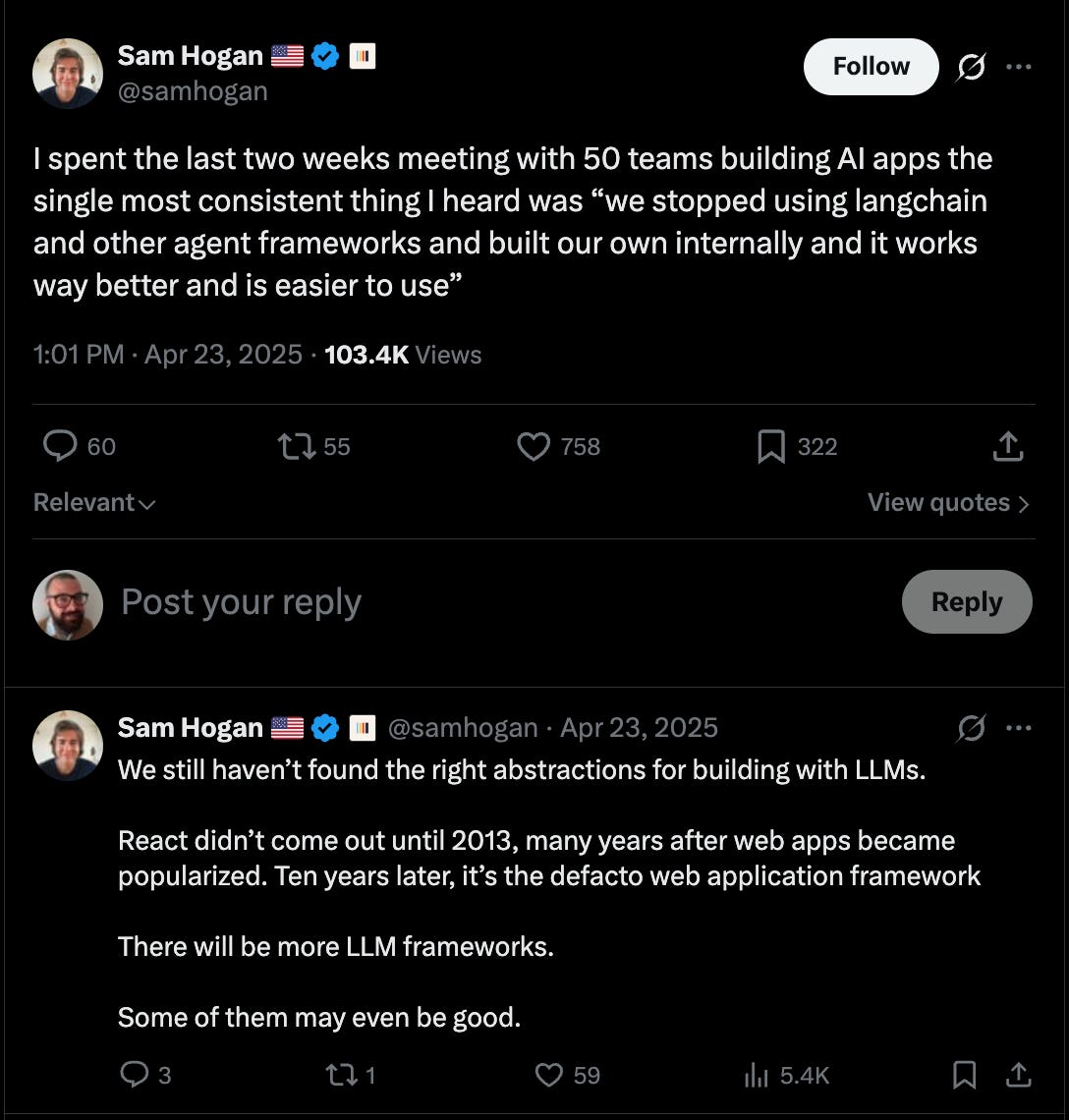
Start with vanilla Python and direct API calls so you understand what your system actually does;
Only adopt a framework when it solves a specific pain point you’ve already experienced: premature framework adoption is the fastest path to proof-of-concept purgatory;
Choose frameworks that abstract away the code you don’t want to write or think about;
Do NOT choose frameworks that abstract away what you need to see in your system (e.g. the prompt);
Choose frameworks based on who builds them and their track record of building OSS dev tools and communities.
In practice
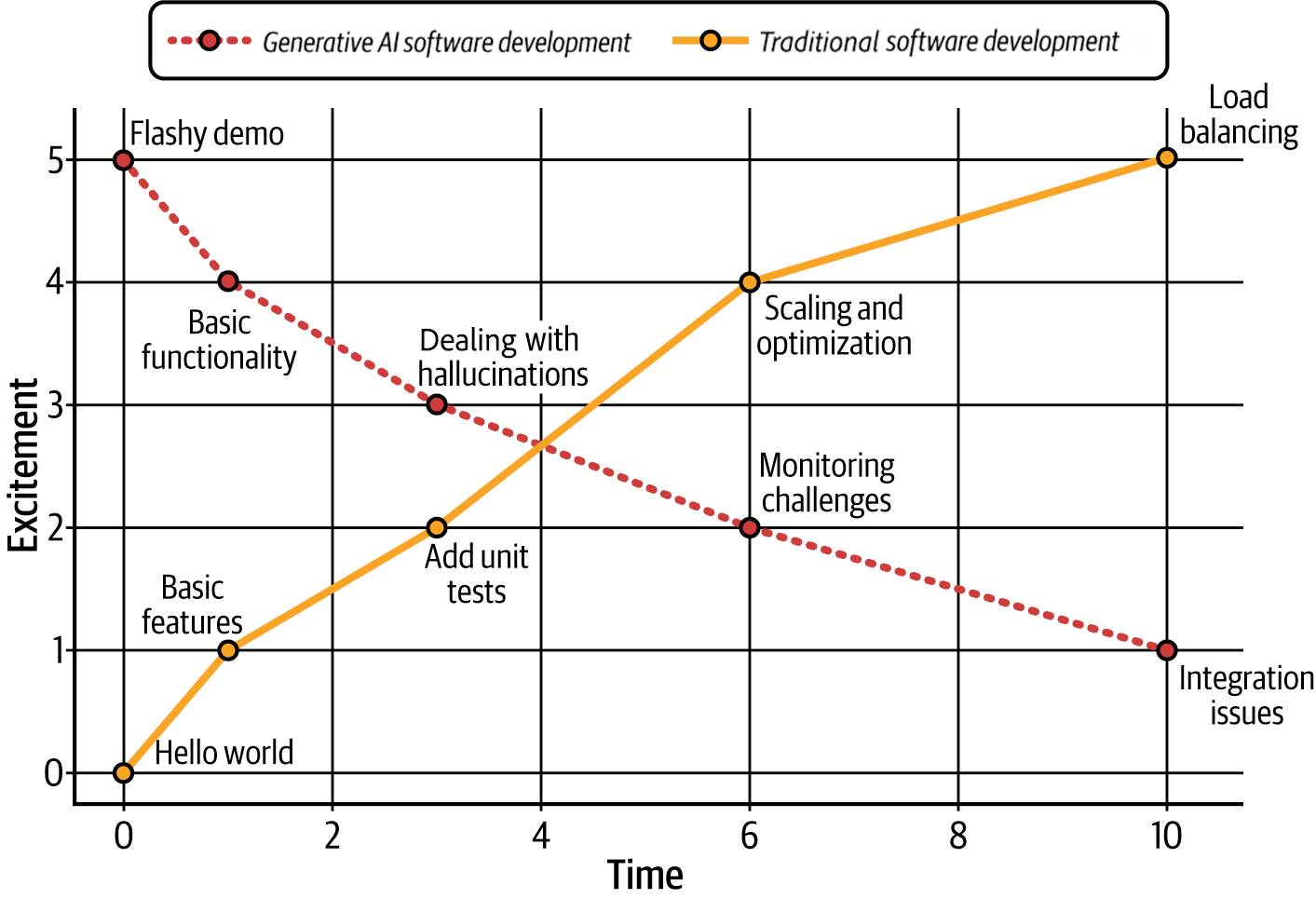
The proof-of-concept purgatory problem. Using frameworks prematurely will get you in POC purgatory. They’re great for demos: with a framework, you can build a RAG system demo in five lines of code. But it’s exactly this abstraction that traps teams: you can’t see what prompt was sent to the LLM, you can’t inspect the retrieval results, you can’t iterate on the pieces that matter. A question from Hugo: “How can we even think about iterating quickly on this MVP when we have no access to all the inner workings?”
Start with vanilla Python and direct API calls. This is our core position in the course, and it comes from watching the same pattern play out repeatedly: teams adopt a framework, build something quickly, ship it, and then 6-12 months later either sunset the product or rip out the framework and rebuild from API calls: this time understanding what they actually need.
When to add a framework. Only when it demonstrably improves outcomes. After you understand your system’s behavior through direct API calls, you’ll know which parts are tedious and error-prone. That’s where a framework earns its place. Make sure to adopt frameworks that abstract away the code you don’t want to write yourself. And when you do adopt tooling, prioritize observability: being able to see what your system is doing is more important than which framework orchestrates it.
Frameworks help you think, not do your job. Stefan’s framing resets the relationship: frameworks are conceptual scaffolding. They organize your thinking about what components a system needs. But you still have to control the API calls, the prompts, the evaluation. And underneath every framework, there’s an API call being made somewhere: remembering that grounds you when the hype gets thick.
The observability pattern. We see nearly all production use cases requiring some custom evaluation, logging, and tracing. The most common pattern is an observability tool (Pydantic + Logfire, Braintrust, Arize, etc.) combined with custom instrumentation. Observability tooling is being commoditized: so choose tools that integrate well and let you switch easily, rather than locking into a platform.
Q6: What are guardrails in LLM applications and how do I implement them effectively?
Guardrails are programmatic checks you run before or after an LLM call. There are two places to put guardrails:
Checking the input before it reaches the LLM (prompt injection detection, PII filtering, scope validation) and
Checking the output after (hallucination detection/groundedness, format validation).
That’s it.
In practice
What guardrails actually are. They range from simple if-else checks (is the output suspiciously short?) to regex (does the input contain a social security number?) to ML models (a fine-tuned BERT for prompt injection detection) to another LLM call (is this response faithful to the provided context?). Off-the-shelf guardrail libraries are just combinations of these same building blocks and we recommend against blindly adopting these; they are at best often too generic to provide strong value in specific use cases and can also mislead.
Start with the system prompt, then add programmatic checks. The cheapest guardrail is a well-written system prompt: “don’t make medical claims,” “cite sources,” “stay on topic.” Many production systems leak their system prompts, and they start with pages of “do not do this.” For input guardrails, delimiters (XML tags, triple backticks) help prevent prompt injection by clearly separating instructions from user data. For output guardrails, use code-based checks before reaching for an LLM judge:they’re faster, cheaper, and deterministic. In the end, you also need to be running tests (See Q7 below).
Make guardrails modular. Build them so you can rip them out and replace them. The guardrails you need will change as your product evolves, as models improve, and as you discover new failure modes.
Guardrails come in layers, and the layers have different properties. Static filters(regex, blocklists, bloom filter matching) are fast and cheap but brittle. Guest Speaker Katharine Jarmul (Privacy expert) showed how GitHub Copilot’s code guardrails (which use bloom filter-style matching to block copyrighted code) were bypassed by simply changing variable names to French. Algorithmic guardrails (classifiers like Llama Guard, LLM-as-judge evaluators) are more nuanced but add latency and cost, and have their own failure modes that need their own evaluation. And then there’s alignment (RLHF, constitutional AI) which shapes model behavior at training time. Most robust, least transparent, and not something most practitioners control directly. Effective systems layer all three: static filters catch the obvious stuff fast, model-based classifiers handle nuance, alignment sets the behavioral baseline. Katharine’s architecture:
input processing → algorithmic guardrails → LLM → algorithmic guardrails → software guardrails → user.
Real-world failure modes. ML Engineer William Horton’s team at Included Health built a customer support bot using internal documents, and it leaked direct phone numbers that were only supposed to be used by support agents. The system wasn’t malicious: it was doing exactly what it was trained to do, just with insufficient guardrails on what information should be exposed.
“Guardrails” means different things to different people. Nicola Roberts (AI Governance Lead, Australia Post) made a point that resonated across cohorts: when executives say “do we have guardrails in place?”, they’re not asking about input/output checks. They’re asking about compliance, risk appetite, accountability, and fallback plans. It’s a marketing term for organizational coverage as much as it is a technical concept.
Q7: How do I write deterministic tests for non-deterministic LLM outputs?
You DON’T write deterministic tests for non-deterministic outputs. You write tests that account for variance, you separate what can be checked deterministically with code (valid JSON, correct format, banned words absent) from what requires judgment (tone, relevance), and you track pass rates over time rather than expecting 100%.
In practice
Don’t aim for 100% pass rates. This is the hardest mindset shift for software engineers. With traditional software, tests should always pass. With LLM applications, an 85% pass rate might be excellent. The goal is to track whether that number goes up or down when you make changes. If your entire test suite passes 100% of the time, your tests aren’t hard enough: add harder cases. Put another way: think “evaluation” not “test.”
Run the same call multiple times to characterize variance. Before deciding if an output is “wrong,” understand the distribution. Stefan recommends calling the same prompt multiple times and looking at how much the output varies. Some fields (like a person’s name) should always be correct. Others (like a skills summary) will have acceptable variance.
Build curated datasets that define your product’s boundaries. Your test dataset isn’t just for testing: it defines what your product should and shouldn’t do. Start with ~20 examples for an MVE, grow to ~100 for more confidence. Use failures you encounter during development as new test cases.
Use a test runner as infrastructure, but think “evaluation” not “test.” You want parameterized cases, CI integration, and fixtures. pytest is the common choice in Python; use whatever your team knows. The key shift: your LLM checks are evaluations with acceptable failure rates, not tests that must always pass.
Two loops, one process. Your dev tests and production evals should be the same system. Don’t build a pytest suite for dev and a separate eval pipeline for prod. Same tests, same data format, same pass rate tracking. CI runs the suite before deploy; production traces feed new test cases back into development.
Run all your test cases, even when some fail. Default test behavior is to stop at the first failure, but for LLM evals you need the full picture. Run everything, collect all outputs, then analyze patterns: “name extraction passes 95%, skills summary passes 60%.” That pattern recognition beats chasing individual failures. In pytest, the pytest-harvest plugin does this; other runners have equivalents.
Q8: What is an MVE (Minimum Viable Eval) and how do I get started with AI evaluation?
An MVE (Minimum Viable Eval) is a set of input-output pairs for your AI system plus a script that runs your system’s outputs against that set. The script can include code checks (string matching, regex, structured output validation) and LLM-as-judge calls. Together, they form your eval harness: the thing that tells you whether a change made your system better or worse.
In practice
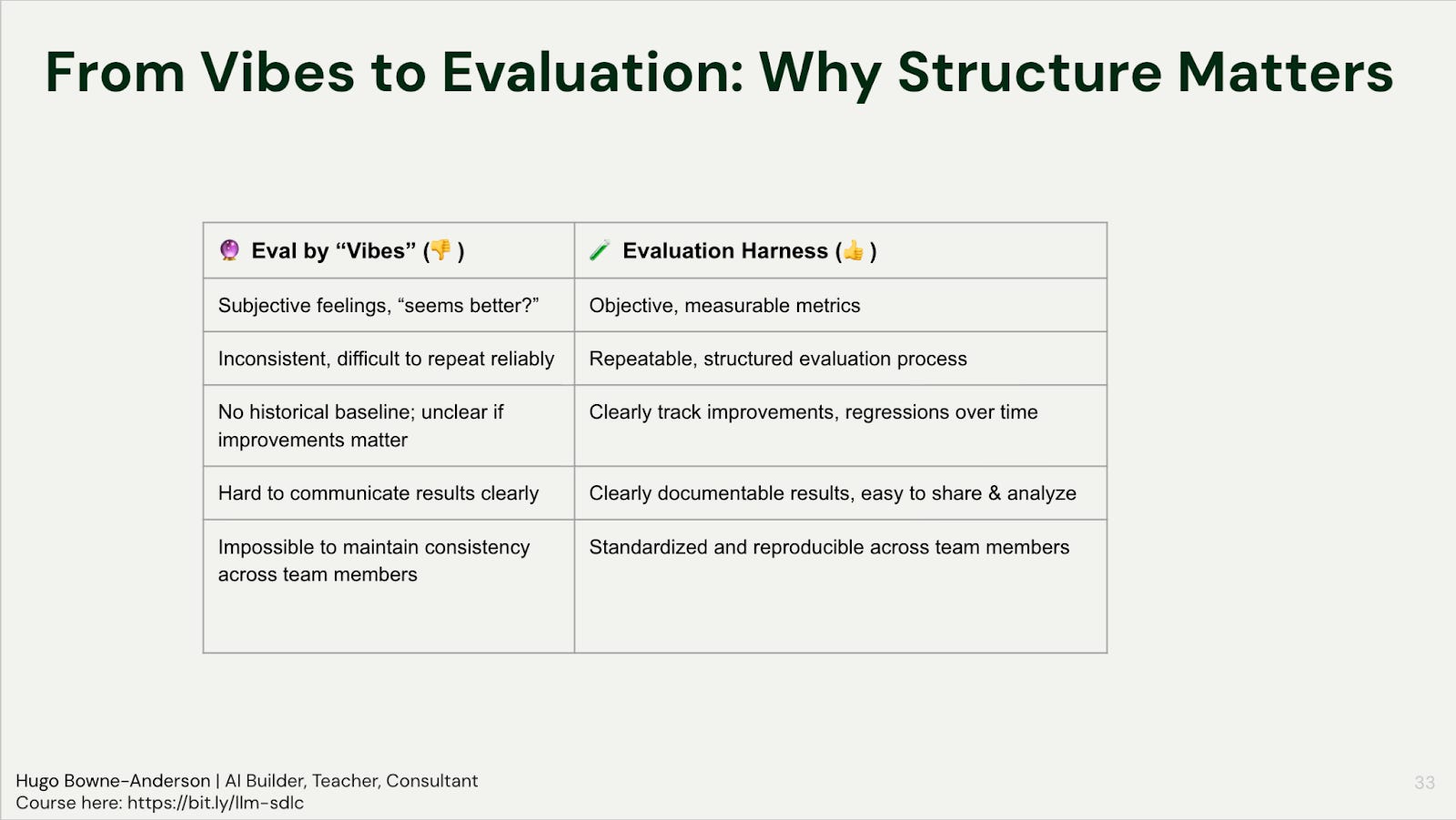
You don’t need to (and shouldn’t) jump to the most sophisticated evaluation frameworks immediately. There is a ladder of evaluation:
Vibe checks
Failure Analysis
Automated evals / Eval Harness (code checks + LLM Judges)
Vibe checks
Start by looking at your data. Before you automate anything, look at 20 input-output pairs from your system. Why 20? It’s a number that seems doable and people almost always get interested when they do that: they see patterns, discover failure modes they hadn’t anticipated, and want to look at more! At this point, you can iterate quickly.
Failure Analysis
Building your MVE. From there, build up to 50-100 samples for your MVE. The experts in the space (Shreya Shankar, Hamel Husain) want at least 100 data points. Natalia Rodnova, working in healthcare, needs thousands. Nathan, AI Engineer at a Fortune 500, reviews 1,200+ samples along various dimensions for each project. But start with 50-100! Iterate as you go: what you want is representative coverage over what types of inputs your users provide.
Spreadsheets & pivot tables. Pass the input samples through your system. Label the responses by hand: accept or reject, with a reason and a failure mode classification. Put it in a spreadsheet. Do a pivot table. You now have failure modes ranked by frequency, and that tells you what to fix first. Hugo acknowledges that people hate it when he tells them to use spreadsheets and pivot tables, but it works.
Pro tip: you don’t need users to begin. Generate synthetic queries by specifying who your user is, what their goal is, and what scenario they’re in.
Automated evals
When to add automated evals & LLM judges. Start with human annotation first. Only move to automated judges after you’ve done enough manual labeling to understand your quality criteria and failure modes. Build the judge by defining clear evaluation dimensions, providing few-shot examples or heuristic rules, and then aligning the judge against your human labels. The judges aren’t a replacement for understanding your data: they’re a way to scale that understanding (more on LLM judges below in Q8).
What’s most important
The virtuous cycle. Deploy, observe behavior, make improvements, ship them, observe again. Evaluation drives this loop. One builder in the course reported going from 86.79% to 94.74% F1 score across three iterations using an eval harness. Nathan Danielsen spends 70-80% of his time on evaluations for Fortune 500 AI projects: “Changing the prompt is a very small part, compared to proving out with some good evaluations that the change to the prompt is measurable and will scale.”
“If your eyes are bleeding from spreadsheets, you’re probably doing LLM evaluation right.” — Philip Carter (Honeycomb, Guest Talk in Course)
Q9: What is an LLM Judge and how do I use them to evaluate other LLM outputs?
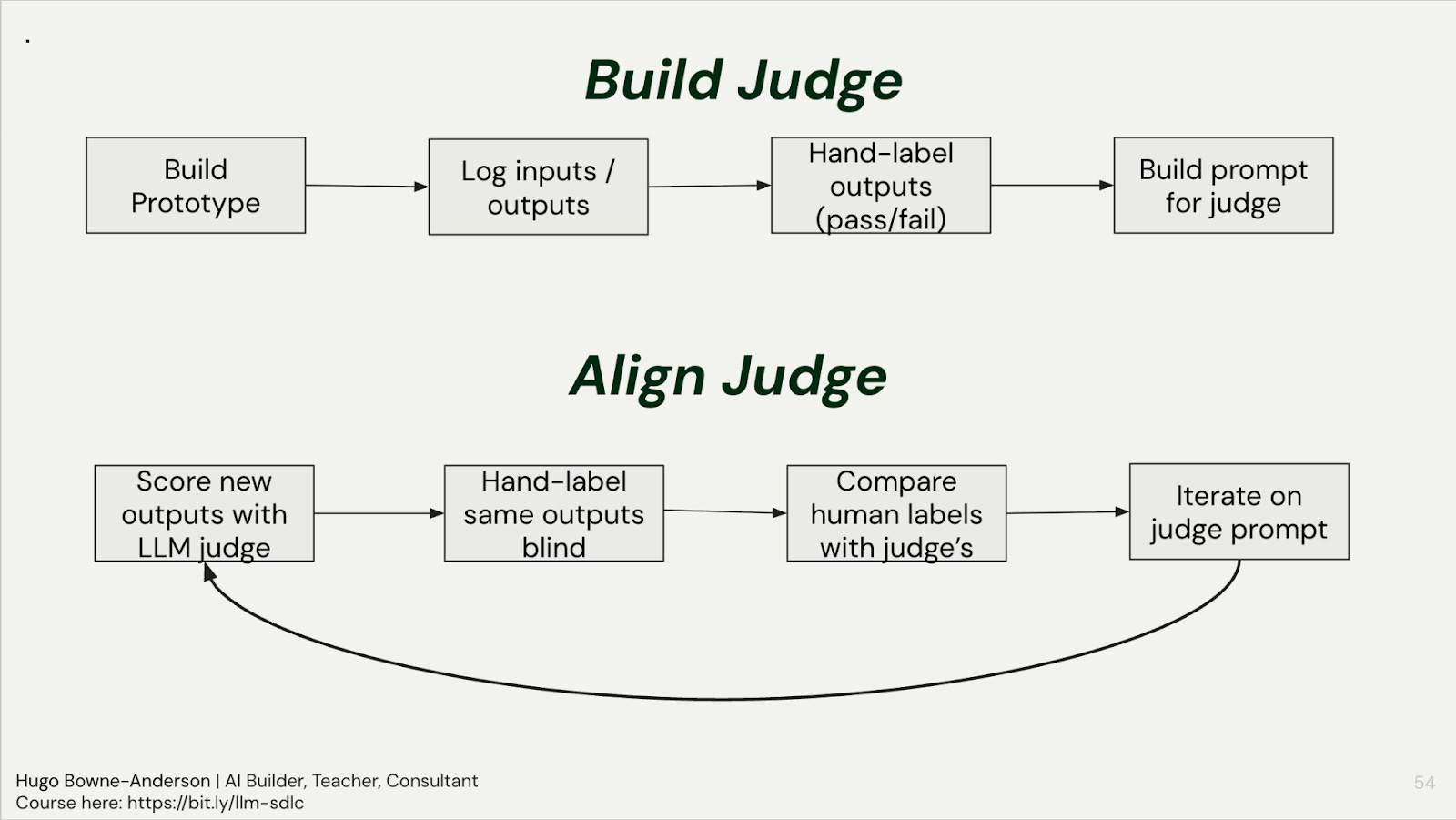
An LLM judge is just a prompt that scores another LLM’s output: the key is aligning it with human labels through iteration (run the judge, hand-label the same outputs blind, compare, and refine the judge prompt until they agree), and building one judge per failure mode rather than one judge for everything.
In practice
Do NOT start with judges or automated evals. Use the ladder of evaluation (see Q8 above).
Use code-based checks for reference-based metrics, i.e. when we have a ground-truth answer (such as “was the correct tool called by an AI travel assistant?”)
Use LLM Judges for reference-free metrics, i.e. when a “correct” response is subjective or there can multiple correct responses, such as “did the travel assistant have a helpful tone?” or “did the medical information assistant offer a diagnosis?”
The most important step in using an LLM Judge is aligning with your own judgements and/or those of an SME
Start with code-based checks. Before reaching for a judge, ask: can I check this with code? JSON schema validation, regex pattern matching, length checks, keyword matching: these are deterministic, cheap (or free), and fast. These are great for reference-based metrics (when we have a ground-truth answer), such as “was the correct tool called by an AI travel assistant?”
Use judges for subjective criteria: Use LLM judges for things that require judgment: tone, relevance, faithfulness to context, quality of reasoning. Also consider using them when there can multiple correct responses.
Align judges with humans: The alignment loop is the most important step. Once you’ve built your judge prompt: (1) run it on new outputs, (2) hand-label the same outputs yourself, blind, (3) compare human vs. judge labels, (4) iterate on the judge prompt where they disagree. Philip Carter (then Honeycomb, now Salesforce) saw alignment go from 68% to 82% to 94% after 3 iterations. One builder in the course saw judge accuracy jump from 65% to 94% after several iterations on the course project.
Pro tips
One judge per failure mode. Don’t build a single judge that evaluates everything. If your failure modes include “hallucinated facts,” “wrong tone,” and “missing key information,” build three separate judges, each with its own prompt, criteria, and examples. This mirrors how you’d assign human reviewers: you wouldn’t ask one person to evaluate everything at once.
Use pass/fail, not Likert scales. Binary evaluation is more reliable and forces clearer criteria. LLMs aren’t great at distinguishing a 3 from a 4 on a 5-point scale. Pass or fail. If it passed, move on. If it failed, categorize why.
Don’t worry about which model to use. You’ll get far more lift from the alignment process than from model selection. Use the cheapest model that works. Note there’s some evidence of self-preference bias (Gemini rates Gemini higher), but the prompt matters more than the model.
Know when you need a judge vs. when you don’t. You need a judge when: you’ve done enough manual annotation to understand your failure modes, you need to evaluate at scale, or you want continuous production monitoring. You don’t need a judge to check if JSON is valid or if a name was extracted correctly.
Q10: When and how should I fine-tune models?
Try everything else first: most production use cases are better served by prompting, retrieval, context engineering, and structured outputs. Fine-tuning still makes sense for small models on edge devices or specialized domains with poor training coverage, but it comes with real costs in infrastructure, maintenance, and reduced flexibility.
In practice
What fine-tuning actually is. It’s continuing a pre-trained model’s training on a new, task-specific dataset. The canonical example: base (completion) models don’t answer questions; ask “what is the capital of France?” and they’ll generate a list of similar questions, because that’s what their training data looks like. Instruction tuning fine-tunes on question-answer pairs, giving us the chat models we use daily. That particular kind of fine-tuning has already been done for you by the big vendors.
When it can still make sense. Small models on edge devices are the clearest use case: if you need a model running locally on a phone with low latency, you can’t use a frontier API model, and fine-tuning a smaller model for your specific task fills that gap. Specialized data domains where the training corpus has poor coverage are another case. In a guest talk in our July cohort last year, Zach Mueller (then technical lead for Hugging Face Accelerate) gave two more examples: knowledge distillation and low-resource languages.
Why not to do it. Infrastructure costs, headcount costs, and maintenance costs aren’t cheap. And when a new model comes out, do you retrain? Fine-tuning also reduces flexibility: the model may handle expected inputs well but perform worse on unexpected ones. The practical reality is that fine-tuning is costly in money, time, and ongoing maintenance.
The protocol if you do it. Get a base model. Prepare your data (collection, cleaning, labeling, curation: this is the hardest part). Choose parameter-efficient fine-tuning (LoRA is the standard approach). Train. Monitor the loss function. Test the output manually. Then evaluate formally. Frameworks like Axolotl (for beginners) and Unsloth (for limited GPU resources) handle the plumbing.
👉 These are also the kinds of things we cover in our Building AI Applications course. Our final cohort starts March 9. Here is a 25% discount code for readers. 👈
Also check out Chapter 1 of our 300 page course reader covering evaluation, testing, RAG, agents, multimodal systems, fine-tuning, production deployment, and more.
Thank you to William Horton, Nathan Danielsen, Bradley Morris, Natalia Rodnova, and John Berryman for providing feedback on drafts of this post.
Also many thanks to the 300+ builders who asked these wonderful questions in our Building AI Applications course!
